Excel to Text Extractor
Instantly extract raw text and data from Excel spreadsheets (XLSX, XLS). Perfect for data parsing, scraping, and content extraction.
💡 How to Use This Tool
Extracting raw text from your Excel spreadsheets takes just a few clicks. Follow these steps:
Upload Your Spreadsheet
Click the dropzone area or drag an Excel file (.xls, .xlsx) up to 100 MB to begin.
Automatic Extraction
Once uploaded, the task immediately begins pulling text on my private servers. No extra buttons needed.
Track Completion Timeline
The Recent Tasks panel shown below tracks processing status. I also provide a floating Tasks drawer globally — check extraction progress from any page on my site.

Download the TXT Document
A green Download button quickly activates upon completion. For privacy, download links are time-limited and only persist for 90 minutes natively.
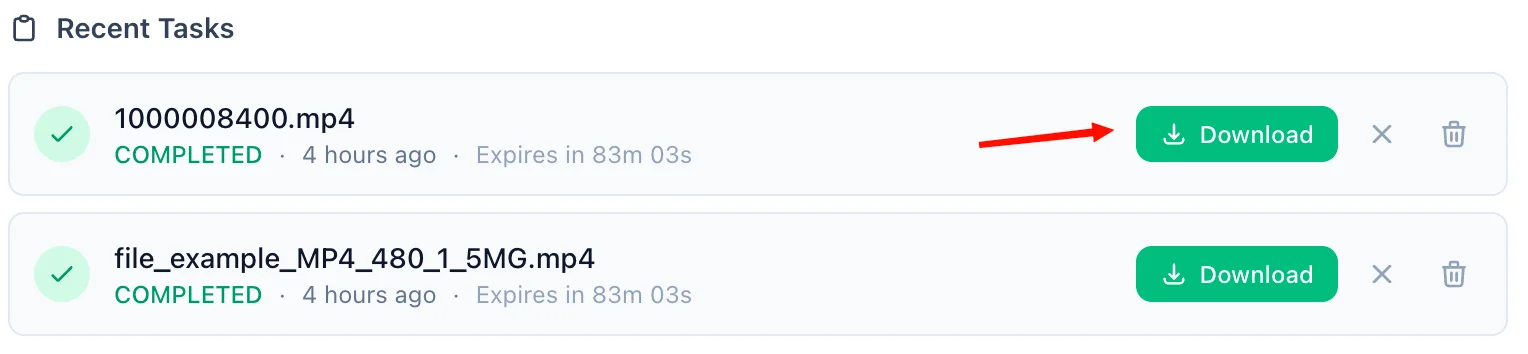
Refreshing Expired Tasks
If your download token expires, simply click the amber Refresh Link mechanism. I'll mint a new active timeframe—no re-upload necessary.

Manual Cleanup
Click the trash icon alongside any task to securely purge the processed files permanently from my cloud bucket servers immediately.
📖 About Excel to Text Extractor
What is an Excel to Text Extractor?
An Excel to Text Extractor is a reliable, cloud-based tool designed to extract pure text content from Microsoft Excel spreadsheets (.xlsx and .xls formats). It reliably pulls all textual data from your spreadsheet cells across all worksheets and outputs it into an easily readable, flat .txt file, completely stripping out complex formatting, charts, macros, and embedded images.
Common Use Cases
- Data Scraping & Analysis: Easily feed raw text from complex spreadsheets into large language models (LLMs), scripts, or text-based data pipelines.
- Searchability Logging: Extract the contents of multiple spreadsheets into simple text logs for rapid indexing, searching, or version control via Git.
- Format Stripping: Remove completely all fonts, colors, and layout structures when you simply care about the core data to ensure compatibility with minimal systems.
- Information Archiving: Store the textual content of large tabular datasets in a highly compressed and universally readable raw format without needing Microsoft Excel.
Key Features
Comprehensive Text Extraction
The extractor traverses every active worksheet within your uploaded Excel file, systematically reading every cell and compiling its underlying text or numeric values into a structured text document.
Legacy support
Whether your spreadsheet is an older .xls file or a newer .xlsx workbook, the engine handles both effortlessly, preventing compatibility issues.
Clean Output
Extracted files use simple tabular separation ( ) where possible, ensuring individual cell data is readable and logically structured within the text, while stripping away heavy UI overhead.
Up to 100MB File Size
The tool handles massive Excel reports with extensive sheets, cleanly pulling content without crashing your desktop spreadsheet software.
Privacy & Security Commitment
Your business and personal data privacy is our highest priority. All extraction processes operate within isolated environments:
- End-to-end connections are heavily protected via encrypted HTTPS.
- Uploaded spreadsheets and processed pure text files are hosted in secure cloud storage, separated logically from other systems.
- Download URLs are time-limited cryptographic links.
- For anonymous users, all documents are systematically and permanently purged within 90 minutes of conversion.
- User accounts benefit from up to 60 days of retention with the ability to delete all records immediately on demand.
- Zero data-mining policy: We never scan, read, or sell the extracted information inside your files.
Technical Details
Conversion dynamically routes dependent upon format version. Modern .xlsx files utilize Python's openpyxl to efficiently iterate through worksheets sequentially and dump pure cell contents tab-delimited, while older binary .xls files are securely routed through LibreOffice Headless (Unoserver) with txt export filters. This ensures robust text recognition regardless of the underlying XML or binary Excel structure. The result is a highly portable .txt file in UTF-8 encoding.
❓ Frequently Asked Questions
Version History
Initial release of Excel to Text Extractor.
Mar 27, 2026

Raakkan (Sankar)
AI-driven Full Stack Developer
Indie developer from Tamil Nadu building fast, privacy-first web tools. Creator of Lovable Tools — a growing collection of free utilities and AI-powered tools.