PowerPoint to PDF Converter
Convert PowerPoint presentations (PPTX, PPT) to PDF format instantly. Preserve slides, fonts, images, and layouts perfectly with no software needed.
💡 How to Use This Tool
Converting your PowerPoint presentations to shareable PDFs takes just a few clicks. Follow these steps:
Upload Your Presentation
Click the dropzone area or drag a PowerPoint file (.ppt, .pptx) up to 100 MB to begin.
Automatic Conversion
Once uploaded, the task immediately begins processing on my private servers. No extra buttons needed.
Track Completion Timeline
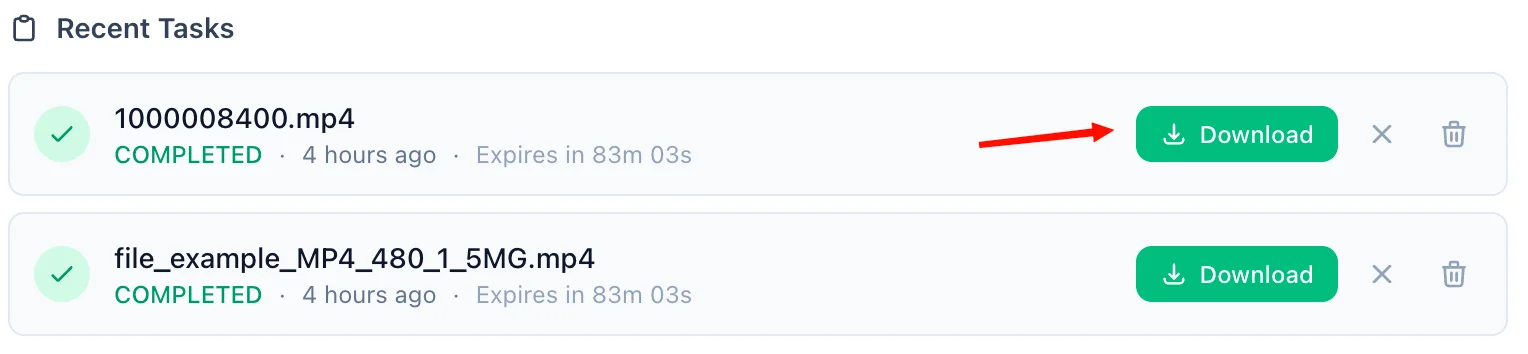
The Recent Tasks panel shown below tracks processing status. I also provide a floating Tasks drawer globally — check conversion progress from any page on my site.

Download the PDF Response
A green Download button quickly activates upon completion. For privacy, download links are time-limited and only persist for 90 minutes natively.
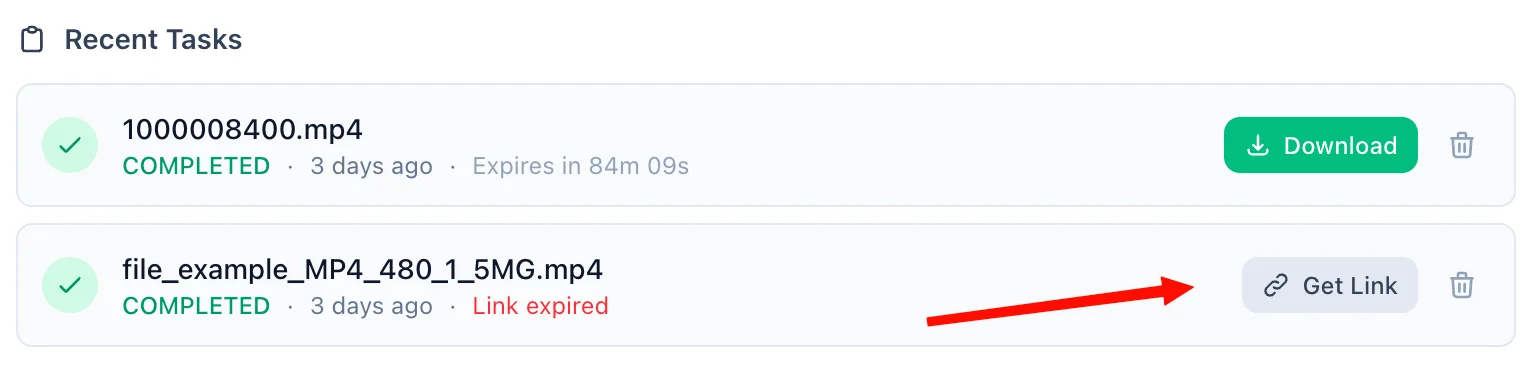
Refreshing Expired Tasks
If your download token expires, simply click the amber Refresh Link mechanism. I'll mint a new active timeframe—no re-upload necessary.
Manual Cleanup
Click the trash icon alongside any task to securely purge the processed files permanently from my cloud bucket servers immediately.
📖 About PowerPoint to PDF Converter
What is a PowerPoint to PDF Converter?
A PowerPoint to PDF Converter is a cloud-based tool that transforms Microsoft PowerPoint presentations (.pptx and .ppt formats) into universally readable PDF (Portable Document Format) files. Using LibreOffice under the hood, this tool renders every slide with exceptional fidelity — preserving fonts, images, shapes, charts, speaker notes, and slide layouts exactly as you designed them.
Common Use Cases
- Sharing Presentations: Send decks to clients, stakeholders, or colleagues without requiring them to have PowerPoint installed. PDF guarantees your slides render identically on every device.
- Publishing & Distribution: Lock your presentation before publishing it online on websites, email newsletters, or document portals. Recipients cannot accidentally alter the content.
- Academic Submissions: Many universities and conferences require PDF submissions to ensure consistent rendering across all review systems.
- Archiving Slide Decks: PDFs are a more stable, self-contained archival format than
.pptxfiles, which can break if fonts or embedded media are unavailable on another machine. - Printing Presentations: PDF files print consistently across all printers and operating systems without requiring slide scaling adjustments in PowerPoint.
Key Features
High-Fidelity Slide Rendering
Powered by LibreOffice Headless, every slide is rendered with exceptional accuracy. Complex layouts with multi-column content, embedded images, charts, animations-as-static-frames, and custom fonts are all faithfully preserved.
Supports Both .PPT and .PPTX
Whether you have a legacy .ppt file from an older version of Microsoft PowerPoint or a modern OpenXML .pptx file, our converter handles both formats seamlessly and reliably.
No Software Installation Required
You do not need Microsoft PowerPoint, Adobe Acrobat, or any desktop software installed. Everything runs in the cloud — just upload your file from any browser on any device, including Mac, Windows, Linux, iOS, and Android.
Large File Support
We support PowerPoint files up to 100 MB, making this suitable for large, media-heavy slide decks with embedded videos, high-resolution images, and complex animations.
Privacy & Security Commitment
Your presentation content is private and processed in a secure environment:
- All files are transmitted over encrypted HTTPS connections, protecting your data in transit.
- Converted PDFs are stored in a secured cloud bucket and accessible only via unique, time-limited cryptographic download links.
- Guest users — both original and converted files are permanently and automatically deleted after 90 minutes.
- Registered users — files are retained for up to 60 days, with the option to manually delete files instantly at any time.
- We enforce strict zero-visibility policies — your slide content is never analyzed, mined, or shared.
Technical Details
Conversion is performed using LibreOffice Headless running the Impress rendering engine. This evaluates embedded formulas, resolves linked assets within the file, and produces a standard PDF/1.4-compliant output compatible with all PDF viewers, including Adobe Acrobat, Preview on macOS, and browser-native PDF viewers. Each slide in the presentation is mapped to a corresponding page in the resulting PDF, maintaining the original slide order and dimensions.
❓ Frequently Asked Questions
Version History
Initial release of PowerPoint to PDF Converter.
Mar 30, 2026

Raakkan (Sankar)
AI-driven Full Stack Developer
Indie developer from Tamil Nadu building fast, privacy-first web tools. Creator of Lovable Tools — a growing collection of free utilities and AI-powered tools.