Word to PDF Converter
Convert Word documents (DOCX, DOC) to PDF instantly. Perfectly preserves layout and formatting while ensuring maximum privacy.
💡 How to Use This Tool
Converting your Word documents to PDF formatting takes just a few clicks. Follow these simple steps:
Upload Your Word Document
Click the upload area or drag and drop a Word file (.doc, .docx - up to 100 MB).
Conversion Starts Automatically
Your file is securely uploaded and a conversion task is queued on my server instantly — no button to press.
Monitor Progress
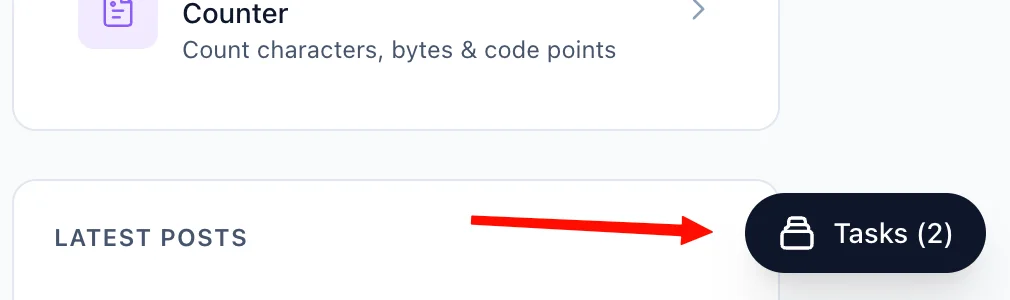
The Recent Tasks list below the upload area tracks your conversion in real time (queued → processing → completed). You can also navigate away — a floating Tasks button in the bottom-right corner of every page lets you check status and download your PDF file from anywhere on the site.
Download Your PDF File
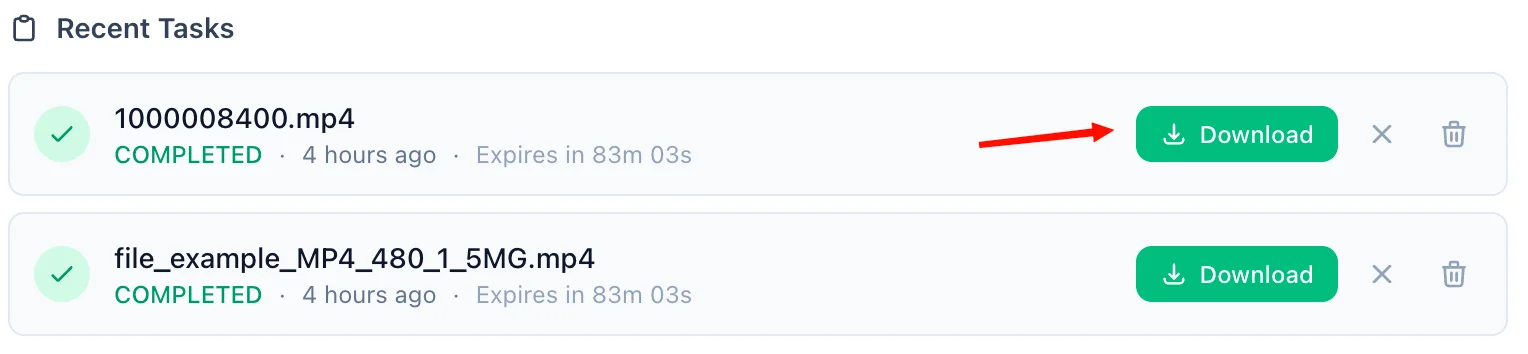
Once complete, a green Download button appears on the task row. Click it to save the PDF file to your device. A live countdown shows how long the link remains valid — download links expire after 90 minutes.
Refresh an Expired Link
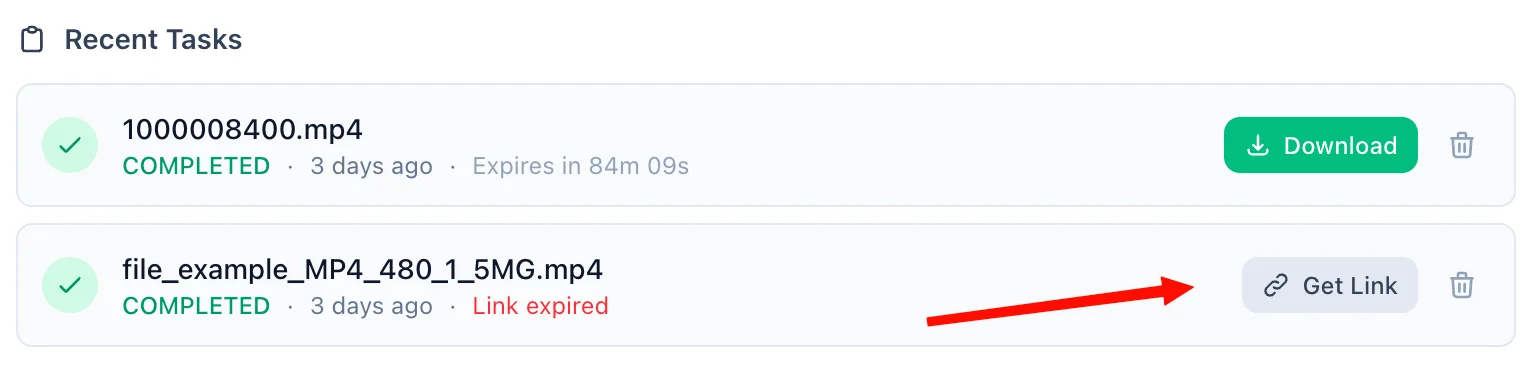
If 90 minutes have passed, the Download button is replaced by an amber Refresh Link button. Click it to generate a fresh 90-minute link on demand — no need to re-upload or re-convert.
Delete When Done
Each task has a trash icon. Clicking it immediately removes the task and permanently deletes the output file from my servers — giving you full control over your data at any time.
📖 About Word to PDF Converter
What is a Word to PDF Converter?
A Word to PDF Converter is an online tool that transforms Microsoft Word documents (.docx and .doc formats) into universally readable PDF (Portable Document Format) files. Our tool uses LibreOffice under the hood to perform this conversion with high fidelity, ensuring your fonts, images, tables, headers, footers, and overall layout are all faithfully reproduced in the resulting PDF.
Common Use Cases
- Sharing Resumes & CVs: PDFs guarantee that your carefully formatted resume looks identical on every recruiter's device, regardless of the Word version they have installed.
- Sending Invoices & Contracts: Prevent accidental editing by sharing financial or legal documents as PDFs. It's the industry-standard format for formal document exchange.
- Publishing Reports: Lock in your report's layout before distributing it to stakeholders, clients, or your team.
- Academic Submissions: Many universities and journals require PDF submissions to ensure consistent rendering.
- Archiving Documents: PDFs are a more stable, self-contained archival format than Word files, which can break if fonts or linked assets are missing.
Key Features
High-Fidelity Conversion
Powered by LibreOffice, the conversion engine used by millions worldwide, our tool accurately handles complex documents including multi-column layouts, embedded images, custom fonts, tables, bullet lists, and footnotes.
Supports Both .DOC and .DOCX
Whether you have a legacy .doc file from an older version of Microsoft Word or a modern .docx file, our converter handles both formats seamlessly.
No Software Required
You do not need Microsoft Word, Adobe Acrobat, or any other software installed. Everything runs in the cloud — just upload your file from any browser on any device.
Large File Support
We support Word documents up to 100 MB, making this suitable for even large, image-heavy reports and presentations.
Privacy & Security
Your documents are private and are processed securely:
- Files are transmitted over an encrypted HTTPS connection.
- Converted files are stored in a secured cloud bucket and are only accessible via a time-limited download link generated specifically for you.
- Guest files are automatically deleted 90 minutes after conversion.
- Signed-in users can access their files for up to 60 days, and can manually delete them at any time.
- We never sell, share, or analyse your document data.
Technical Details
The conversion is performed using LibreOffice Headless (--convert-to pdf:writer_pdf_Export), which is the same rendering engine that powers LibreOffice Writer. This ensures the highest possible compatibility with the Open Document and OOXML specification used by .doc and .docx files respectively. The resulting PDF is a standard PDF/1.4-compliant file compatible with all PDF viewers.
❓ Frequently Asked Questions
Version History
Initial release of Word to PDF Converter.
Mar 25, 2026

Raakkan (Sankar)
AI-driven Full Stack Developer
Indie developer from Tamil Nadu building fast, privacy-first web tools. Creator of Lovable Tools — a growing collection of free utilities and AI-powered tools.